
Time to Interactive (TTI): Why It Matters and How to Improve It
Nisha Katariya
Published on January 6, 2026
11 min read
Share on:
Industry benchmarks recommend that websites load within two seconds, yet real-world performance often falls short, especially on mobile, where average load times reach 8.6 seconds.
As a result, 53% of mobile users abandon a site if it takes longer than three seconds to load.
These delays directly affect user perception.
Even a three-second wait can reduce customer satisfaction by 16%, and nearly half of users share negative experiences after encountering slow or unresponsive websites.
This makes performance a critical factor in user engagement and brand trust.
However, speed is not just about how fast a page appears. Users expect visible elements to work immediately. When a page looks ready but fails to respond to clicks or input, it feels slow or broken.
Time to Interactive (TTI) measures exactly this gap: the time it takes for a page to become fully responsive and usable. Improving TTI ensures that pages not only load quickly but also meet user expectations for smooth, reliable interaction.
In this article, we discuss what Time to Interactive is, how it is measured, why it is important, and how it can be improved.
Before proceeding with this article, if your pages appear loaded but feel unresponsive, a performance audit can help reveal the underlying issues. Measure time to interactive, detect main-thread blocking issues, and uncover hidden performance gaps affecting your users.
Check Your Website’s Time to Interactive
Now, let's understand...
What is Time to Interactive?
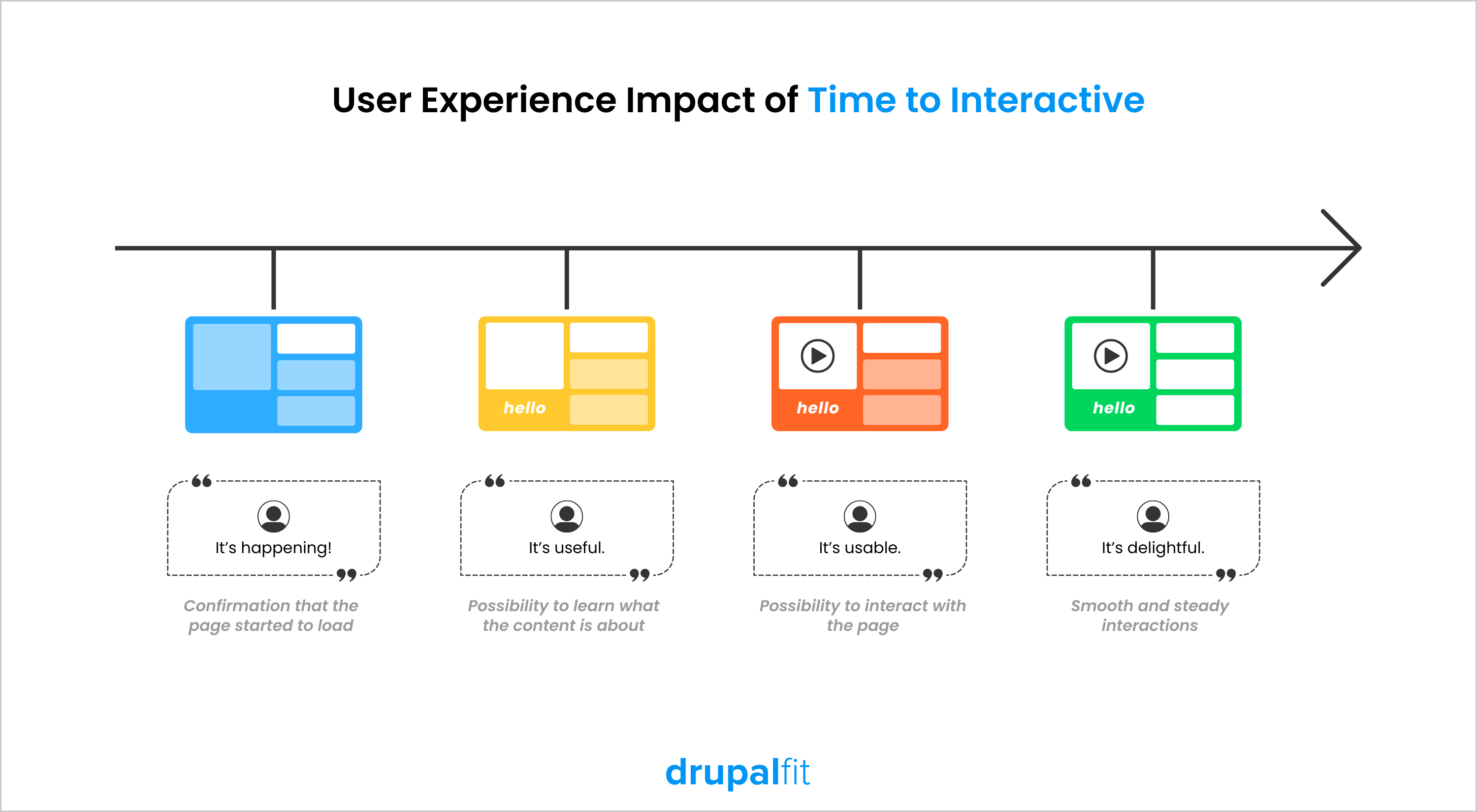
Time to Interactive (TTI) refers to the duration it takes for a webpage to become completely interactive after a user visits it, making it an important metric for website speed.
PageSpeed Insights (PSI) defines a page as fully interactive when:
- The page shows useful content, and event handlers are set up for the most visible elements.
- The page reacts to user actions quickly, enabling smooth interactivity.
To understand this better, a few points need clarification:
- FCP (First Contentful Paint) indicates when a page begins to display content. Time to Interactive can only be achieved after FCP, and a large gap between these metrics can signal performance issues.
- Event handlers are scripts that run automatically when an event occurs. For example, when a user clicks a button, the event handlers respond by delivering the expected outcome. If event handlers are missing, especially for visible elements, your website will not react to user input.
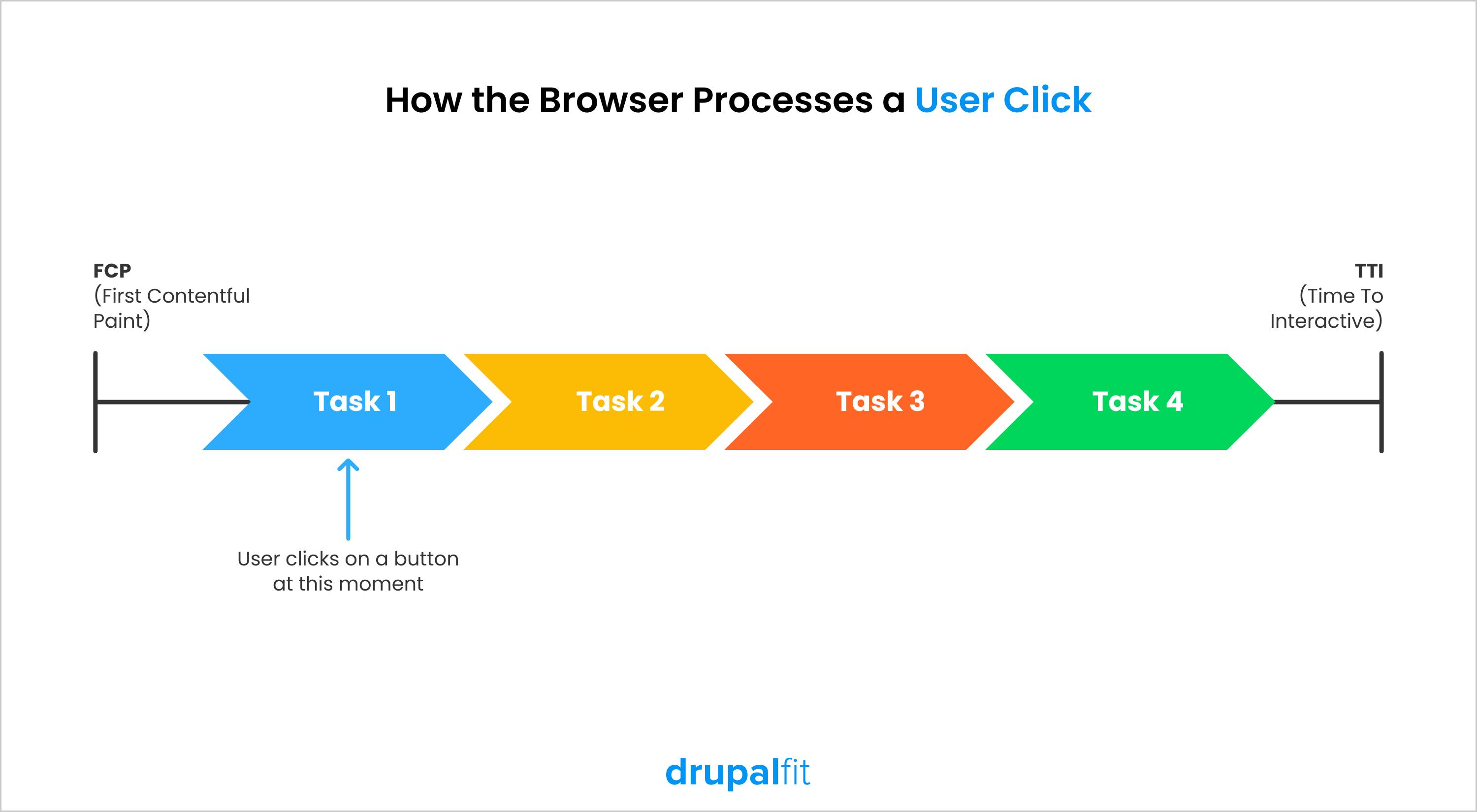
Delays in responsiveness can occur due to Long Tasks that block the main thread, highlighting the importance of measuring and optimizing time to interactive.
What is a Good Time to Interactive?
A good time to interactive helps a site feel fast, usable, and reliable, especially on mobile devices. In most cases, a time to interactive under 3.8 seconds provides a smooth experience for users.
The following ranges help interpret your time to interactive score:
0–3.8 seconds | Fast and fully interactive |
3.9–7.3 seconds | Usable but delayed |
Above 7.3 seconds | Slow and frustrating to interact with |
How is Time to Interactive Calculated?
Time to Interactive is measured in seconds, representing the time it takes for a page to become fully interactive. To calculate it, you need:
Here’s how time to interactive is determined-
The browser first identifies First Contentful Paint (FCP), which marks the point when the first visible content appears on the page.
After FCP, the browser monitors activity on the main thread. It looks for a five-second window during which-
- No JavaScript task runs longer than 50 milliseconds
- No more than two network requests remain in flight
This period indicates that most heavy processing has finished, and the page can respond reliably to user input.
Time to Interactive is recorded at the end of the last long task that occurs before this low-activity window begins.
If no long tasks run after FCP, then the time to interactive is the same as FCP.
Also Check Out
Technical SEO Excellence: Boost Visibility with Smart Audits Using DrupalFit
Website Audit: Perform Like a Pro and Elevate Your Digital Experience
Why is Time to Interactive (TTI) Important?
Time to Interactive matters because it reflects the real-world experience users have on your website. A faster TTI means visitors can start interacting with content sooner, which directly improves user satisfaction, engagement, and trust in your site.
Impact on User Experience
Time to Interactive has a direct and significant impact on user experience. Users expect a page to respond as soon as it appears loaded, and any delay in interactivity can cause frustration and confusion.
This is especially critical for complex websites and applications where users perform important actions such as filling out forms, navigating dashboards, or completing purchases. If the page looks ready but does not respond, users may assume something is broken.
A faster time to interactive ensures that interactions happen smoothly and without delay. This encourages users to stay longer, explore more content, and complete desired actions. As a result, websites with good time to interactive typically see lower bounce rates, higher engagement, and a more positive overall user experience.
Impact on SEO
While Time to Interactive is not a direct ranking factor, it plays an important role in SEO by influencing user experience signals. Search engines prioritize websites that provide smooth, responsive experiences, and slow interactivity often leads to higher bounce rates and reduced engagement.
When users leave a site quickly due to unresponsive pages, search engines may interpret this behavior as a sign of poor quality. As search algorithms continue to evolve, they increasingly reward websites that load quickly and respond immediately to user actions.
Optimizing time to interactive helps improve engagement metrics, which are strong indicators of content value. Over time, this can contribute to better organic visibility and stronger search performance.
To improve your time to interactive, you first need to understand where your site stands. A performance audit helps you identify your current TTI score and uncover the exact issues slowing down interactivity.
Improve your Time to Interactive
Let’s break down...
What Are the Reasons Behind Slow TTI?
Now that we understand what time to interactive is, let’s look at some of the main reasons why your TTI may be slow:
Large network payload size
The First Contentful Paint event occurs when the first significant element shows up on the page. Regardless of the type of element, its display can be postponed if there are render-blocking resources above it on the page that download large files over sometimes unreliable internet connections, such as a <script> or <link> tag that refers to a stylesheet.
To address this, we recommend optimizing the source code to make it 'lighter' by minimizing its file size as much as possible and also avoiding third-party libraries when feasible. With improved browser support, you might not need as many language polyfills as you did in the past.
Excessive JavaScript during page loading
The primary cause of a slow time to interactive is the excessive amount of JavaScript that contemporary websites utilize. Specifically, Long JavaScript Tasks (any tasks exceeding 50ms) can hinder your TTI.
Here’s the explanation:
When a page is being rendered, modern browsers depend on the main thread to perform numerous tasks. Main Thread's responsibilities: Parse HTML, build the DOM, create the layout tree, manage CSS and JS, among other things.
Long Tasks consume a considerable amount of time on the main thread. During these tasks, browsers cannot interrupt them. If a user clicks a button while one of these tasks is in progress, the browser is unable to respond to the input.
Multiple network requests happen at once
Managing network requests is important, especially for images. While browsers start loading images without blocking rendering, too many large, unoptimized images loading simultaneously can increase load times and delay TTI.
Requests for images in progress don’t block interaction; you can still use the site while images load. To improve time to interactive, implement lazy loading, which loads images only when users scroll to them, and optimize image sizes where needed.
How to Improve Time to Interactive?
Although many reasons could slow your website’s TTI, there are a few easy and effective ways to improve it. These include:
Optimize JavaScript Execution
Reduce main-thread blocking time to ensure your page responds quickly. Actions include:
- Minimize and compress JavaScript files.
- Eliminate unused code.
- Split long tasks into smaller chunks.
- Replace large libraries with lighter alternatives.
- Reduce the impact of third-party scripts.
Minimize Network Requests
Lower the number of simultaneous requests to speed up page loading:
- Combine files where possible.
- Avoid unnecessary critical requests.
- Preload key resources for faster availability.
Use Resource Hints
Resource hints help browsers fetch essential content earlier:
- Preconnect / DNS-prefetch: Establish early connections to important third-party servers.
- Preload: Load critical resources ahead of time for faster interactivity.
Analyze Main Thread
Work on identifying and optimizing tasks that block the browser’s main thread:
- Use tools like Lighthouse to check long tasks, scripting time, and request chains.
- Focus on tasks over 50ms that delay interactivity.
Lazy Load Non-Critical Assets
Defer images, videos, and scripts that aren’t needed immediately. This reduces blocking and improves time to interactive.
By implementing these strategies, you ensure that your website becomes fully interactive faster, providing a smooth, responsive experience for users.
ALSO CHECK OUT
Full-Spectrum Site Analysis: Where SEO, Performance, Security & Accessibility Converge
DrupalFit: Your One-Stop Solution for Security, Accessibility & Performance
DrupalFit Challenge at DrupalCon Vienna: Celebrating the Fittest Drupal Websites
Key Takeaways
- Time to Interactive (TTI) measures how long a page takes to become fully responsive, indicating when users can reliably interact with visible elements.
- A good TTI ensures users can interact with a page quickly, reducing frustration and improving engagement, especially on mobile devices.
- Long JavaScript tasks and main-thread blocking are major reasons why pages feel unresponsive even after they load.
- Excessive network requests and unoptimized assets can delay interactivity, even when content is visible on the screen.
- Improving time to interactive requires focused optimization of JavaScript, network activity, and non-critical resources to deliver a smooth user experience.