The Complete Website Security Checklist for Drupal Security Compliance
Palak Agrawal
Published on August 27, 2026
12 min read
Share on:
Your Drupal website passed its last security audit. Your team fixed the reported vulnerabilities, applied the latest drupal security update, and closed the findings. But what happens after the next deployment?
A new module gets added. A developer changes a configuration. An old user account remains active. A dependency becomes vulnerable. None of these changes may seem significant on their own, but together they can change your website's drupal security posture.
That is the challenge security teams face. Your website security checklist cannot stop at finding vulnerabilities. You need to keep applying website security best practices as the website changes.
This becomes even more important when drupal security is tied to compliance. Regulations like GDPR require organizations to put appropriate technical and organizational measures in place as part of gdpr website compliance, while standards such as PCI DSS and OWASP ASVS provide more specific security expectations.
So, what should you actually check when it comes to drupal security?
Here are 10 Drupal website security checks to help you identify common gaps, strengthen controls such as drupal 2fa and your drupal security advisory process, and keep your website compliant over time.
What Does Website Security Compliance Mean?
Website security compliance means your site meets the technical and procedural requirements set out by a recognized standard or regulation. The standard that applies to you depends on what your site does and who it serves. A few you'll run into often:
- GDPR: Protects personal data and requires appropriate technical and organizational measures, forming the backbone of gdpr website compliance for regulated data.
- PCI DSS: Applies to organizations that handle payment card data.
- HIPAA: Covers the protection of certain health information in the US.
- OWASP ASVS: Provides a technical framework for testing application security.
For organizations handling EU personal data, gdpr website compliance is often the specific driver behind this checklist, and regulators have shown they will enforce it. Cumulative GDPR fines have surpassed €7.1 billion since 2018, with roughly €1.2 billion issued in 2025 alone.
Compliance is not simply about passing an audit. You need to be able to show that security controls are implemented, monitored, and maintained.
That distinction matters for Drupal websites because they change frequently. A site that passed a security review six months ago may have a new module, integration, user, or configuration change today.
Is Drupal Security Enough for a Compliance-Driven Website?
To answer in short, yes. Drupal provides a strong security foundation, which is one reason more than 150 government agencies worldwide use it alongside organizations in regulated industries.
Drupal also has a dedicated Security Team that reviews vulnerabilities, coordinates fixes, and publishes security advisories. The platform includes several protections by default. For example, Twig automatically escapes output to help prevent cross-site scripting, while Drupal's database APIs support parameterized queries to reduce SQL injection risks.
But Drupal itself doesn't guarantee security.
Custom code can introduce vulnerabilities, outdated modules can create entry points, and poor server configuration can expose sensitive information. Excessive permissions can also increase the impact of a compromised account.
The only way to protect your website from possible cyber attacks and security vulnerabilities is to continuously check your website for such loopholes.
Website Security Checklist for Drupal Security Compliance
It’s easy to say that you should make your Drupal website secure, but nobody tells you exactly what to focus on when conducting security checks. So, here are 10 Drupal website security checks to keep in mind when ensuring that your website meets security compliance requirements.
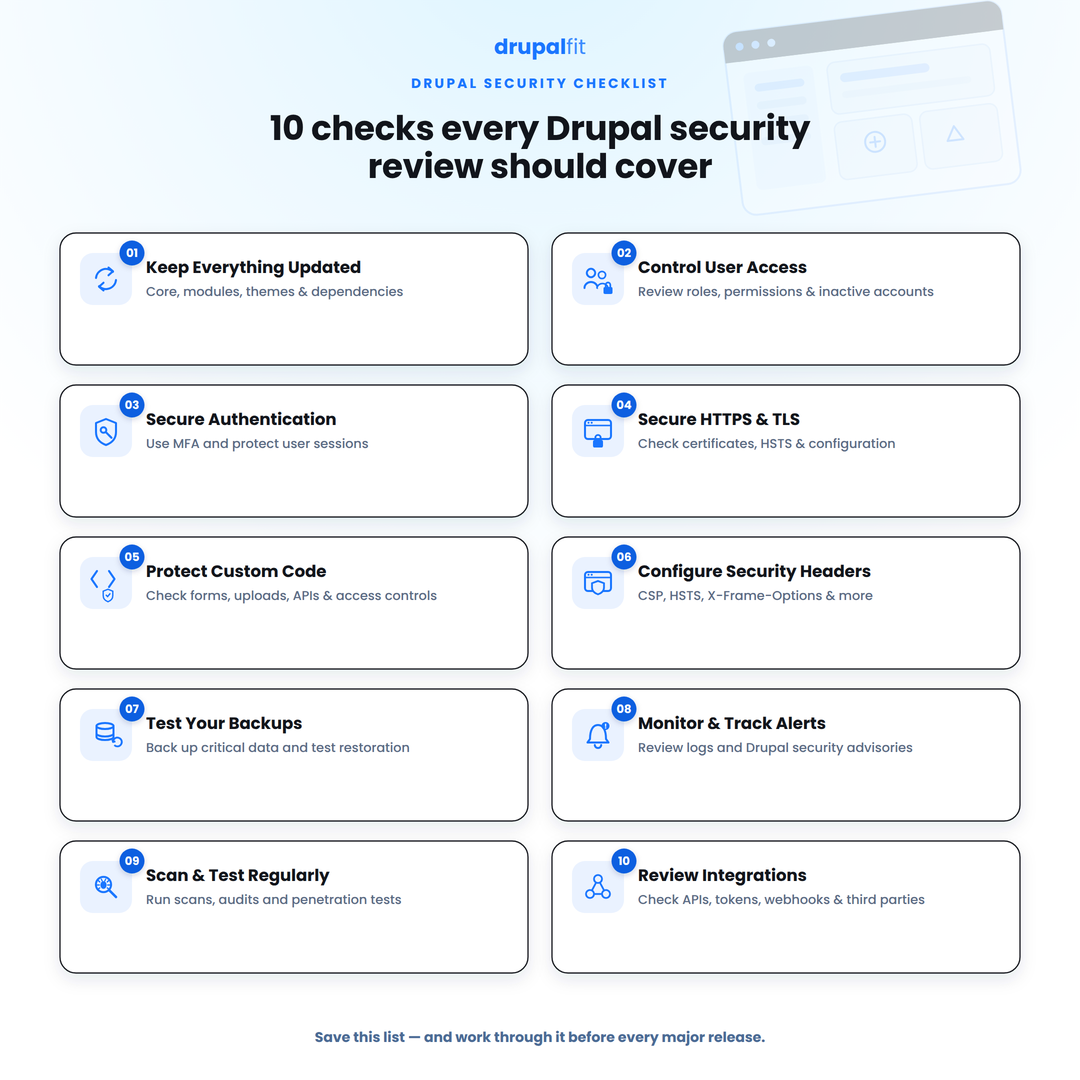
1. Keep Drupal core, modules, and dependencies updated
Patching is one of the simplest things you can do to reduce security risks on your Drupal website. As per Verizon's 2026 DBIR report, it found that vulnerability exploitation accounted for 31% of breaches, making it the leading initial access vector in the report.
But don't look at Drupal core alone. Your security checks should cover:
- Drupal core
- Contributed modules
- Themes
- Composer packages
- Third-party libraries
- Custom components
Drupal 7 reached end of life on January 5, 2025, while Drupal 10 is scheduled to reach end of life in December 2026. Once a Drupal version reaches end of life, it no longer receives regular security support. The same applies to modules and other dependencies that are no longer maintained.
So, if your website is running an older or soon-to-be unsupported version, start planning your upgrade before security support ends
2. Control access with least-privilege permissions
A compromised administrator account can cause far more damage than a compromised content editor account. Drupal's roles and permissions system lets you separate access according to what people actually need to do.
For example, a content editor may need to create and publish content but should not necessarily be able to install modules or change site configuration. So, review regularly:
- Administrator accounts
- Privileged permissions
- Developer access
- Contractor accounts
- Former employee accounts
- Inactive users
- Shared accounts
The goal is to make sure that if one account is compromised, the attacker's access is limited.
3. Strengthen authentication and session security
Strong passwords are important, but they are not enough to protect privileged Drupal accounts. If an administrator's password is compromised, an attacker can potentially gain access to sensitive areas of the website.
That's where multi-factor authentication adds another layer of protection. Recent Drupal core releases include native Drupal 2FA support, and Microsoft's research has found that MFA can block more than 99% of account-compromise attacks.
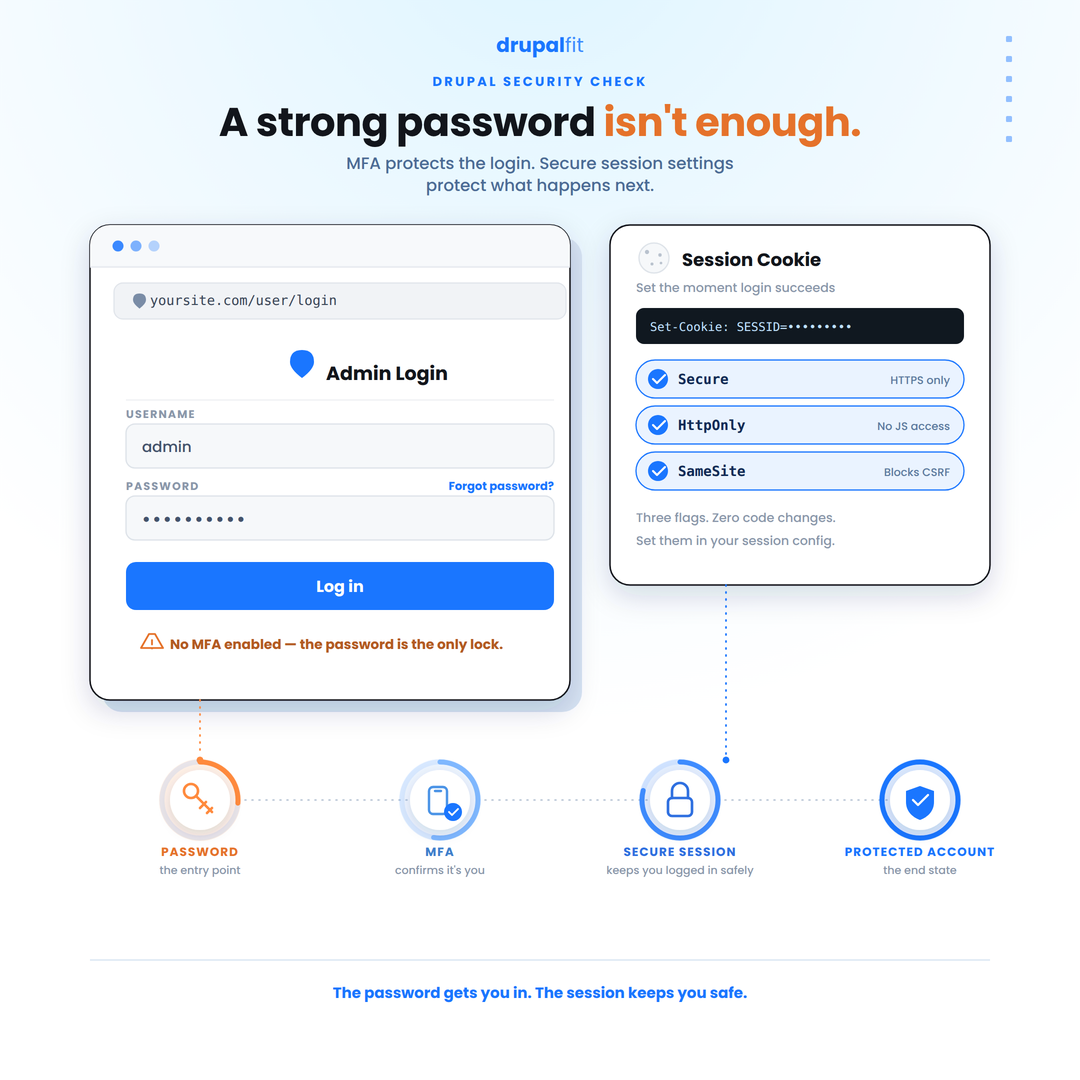
But securing the login process is only part of the job. You also need to protect what happens after a user logs in. Drupal uses session cookies to keep users authenticated, so those cookies should be configured securely:
- Secure: Sends the cookie only over HTTPS
- HttpOnly: Prevents client-side scripts from accessing it directly
- SameSite: Helps reduce certain cross-site request risks
Also review your login and session configuration, especially when Drupal runs behind a CDN or reverse proxy. This ensures Drupal handles authentication and user sessions securely across the entire request path.
4. Secure HTTPS, TLS, and Drupal configuration
Another important Drupal website security tip is to secure HTTPS, TLS, and your Drupal configuration. HTTPS should protect your entire website, not just the login or payment pages. Make sure HTTP traffic redirects to HTTPS and that your TLS certificates are properly configured and maintained.
If Drupal runs behind a CDN, load balancer, or reverse proxy, check that it correctly identifies HTTPS requests. Also review trusted_host_patterns in settings.php to see if Drupal only accepts expected hostnames.
During your security check, review:
- TLS and certificate configuration
- HTTP-to-HTTPS redirects
- HSTS
- Secure cookies
- Mixed content
- Unexpected hostnames
HSTS tells browsers to always use HTTPS, even when someone tries to access the site over HTTP. Finally, review error reporting, file permissions, development settings, exposed services, and sensitive files like settings.php. A secure Drupal installation can still become vulnerable because of poor configuration
5. Protect forms, file uploads, and custom code
Drupal provides security APIs to handle user input safely, but developers still need to use them correctly. Every form, API endpoint, URL parameter, and file upload can become an attack surface if it isn't handled properly. When reviewing custom Drupal development, make sure you:
- Validate input before processing it.
- Use Drupal's Database API and parameterized queries.
- Escape output appropriately.
- Restrict access to sensitive routes.
- Limit file types and åupload locations.
- Check custom code for XSS, SQL injection, CSRF, and access-control issues.
The risk doesn't always come from Drupal core. A poorly written custom module can introduce a vulnerability even when Drupal and all contributed modules are fully patched.
6. Add browser and infrastructure security controls
Another important Drupal website security measure is configuring security headers. They add another layer of protection at the browser level and can help reduce risks like clickjacking, XSS, and MIME-type attacks.
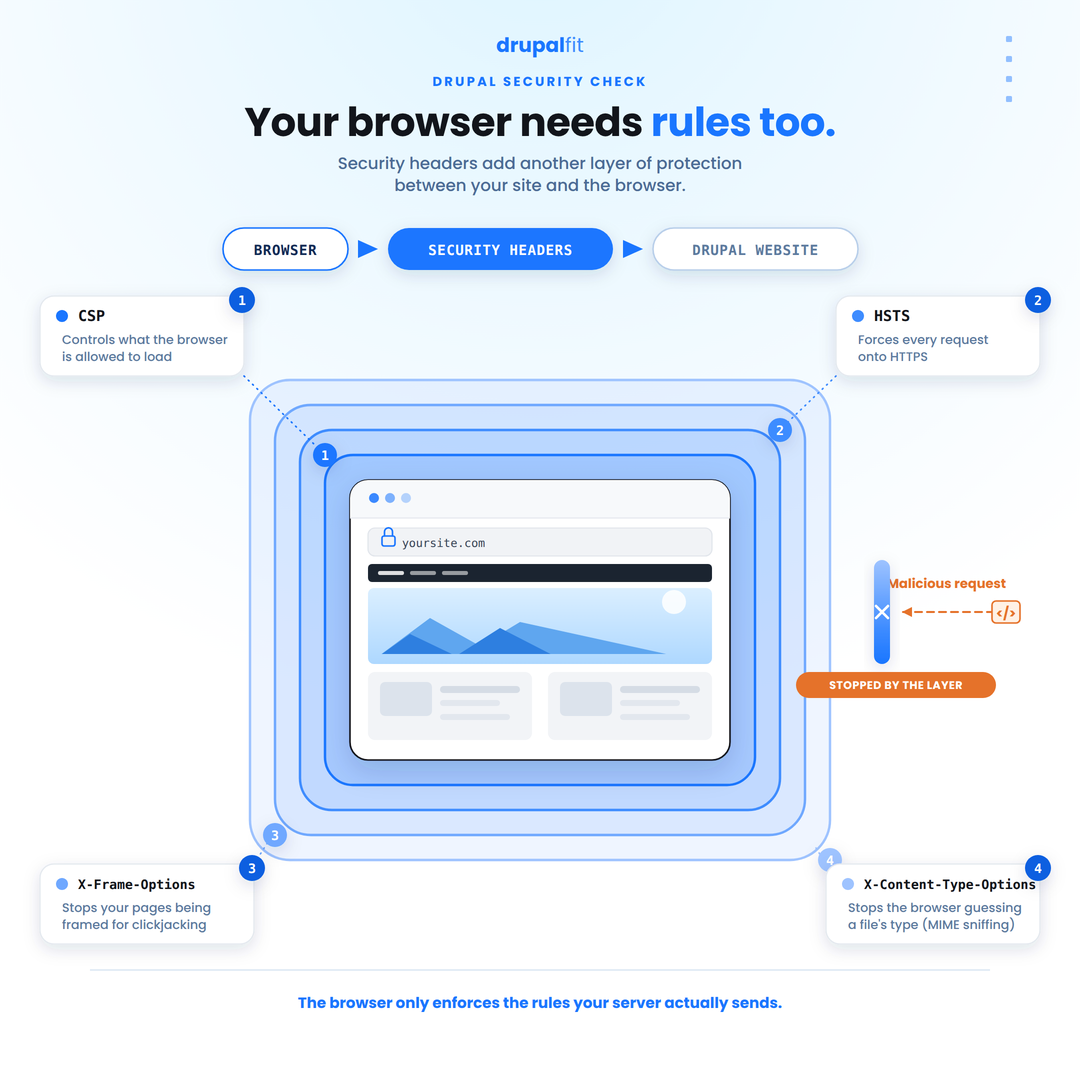
A few common headers include:
- Content-Security-Policy (CSP): Controls which resources the browser can load.
- X-Content-Type-Options: Helps prevent MIME-type sniffing.
- X-Frame-Options: Helps protect against clickjacking.
- Strict-Transport-Security: Forces browsers to use HTTPS.
You can configure these at the server, CDN, or Drupal level. Just make sure you configure the headers for your website. For example, an overly restrictive CSP can break legitimate scripts and third-party integrations. Test your changes before enforcing them in production.
7. Maintain tested, offsite backups
If due to some unfortunate reason, your drupal website is compromised or critical data is lost, a reliable backup can help restore the site and minimize downtime. Your backup strategy should cover the database, uploaded files, configuration, and other critical application assets. It should also define:
- How frequently backups are taken
- Where they are stored
- Who can access them
- How long they are retained
- How often restoration is tested
Store backups separately from the production environment whenever possible. If an attacker gains access to the server, backups stored on the same system could also be deleted or encrypted.
Regular restoration tests are just as important as taking backups. A backup is only useful if you can successfully restore it when you need it.
8. Track and respond to Drupal security advisories quickly
Drupal’s Security Team publishes formal advisories for core and contributed modules (SA‑CORE and SA‑CONTRIB). In 2025 alone, Drupal issued 43 security advisories covering vulnerabilities in core and contributed projects.
High‑severity issues can be weaponized within hours. For example, the critical SQL injection in Drupal Core (CVE‑2026‑9082, May 2026) saw over 15,000 exploitation attempts against nearly 6,000 sites in 65 countries within 48 hours of the patch release, prompting CISA to add it to its Known Exploited Vulnerabilities catalog with an emergency remediation deadline
9. Run regular vulnerability scans and penetration tests
A vulnerability scan, security audit, and penetration test serve different purposes.
A vulnerability scan looks for known vulnerabilities, outdated components, exposed services, and insecure configurations.
A security audit reviews whether security controls are actually configured and maintained.
A penetration test attempts to exploit weaknesses within a defined scope to understand what an attacker could achieve.
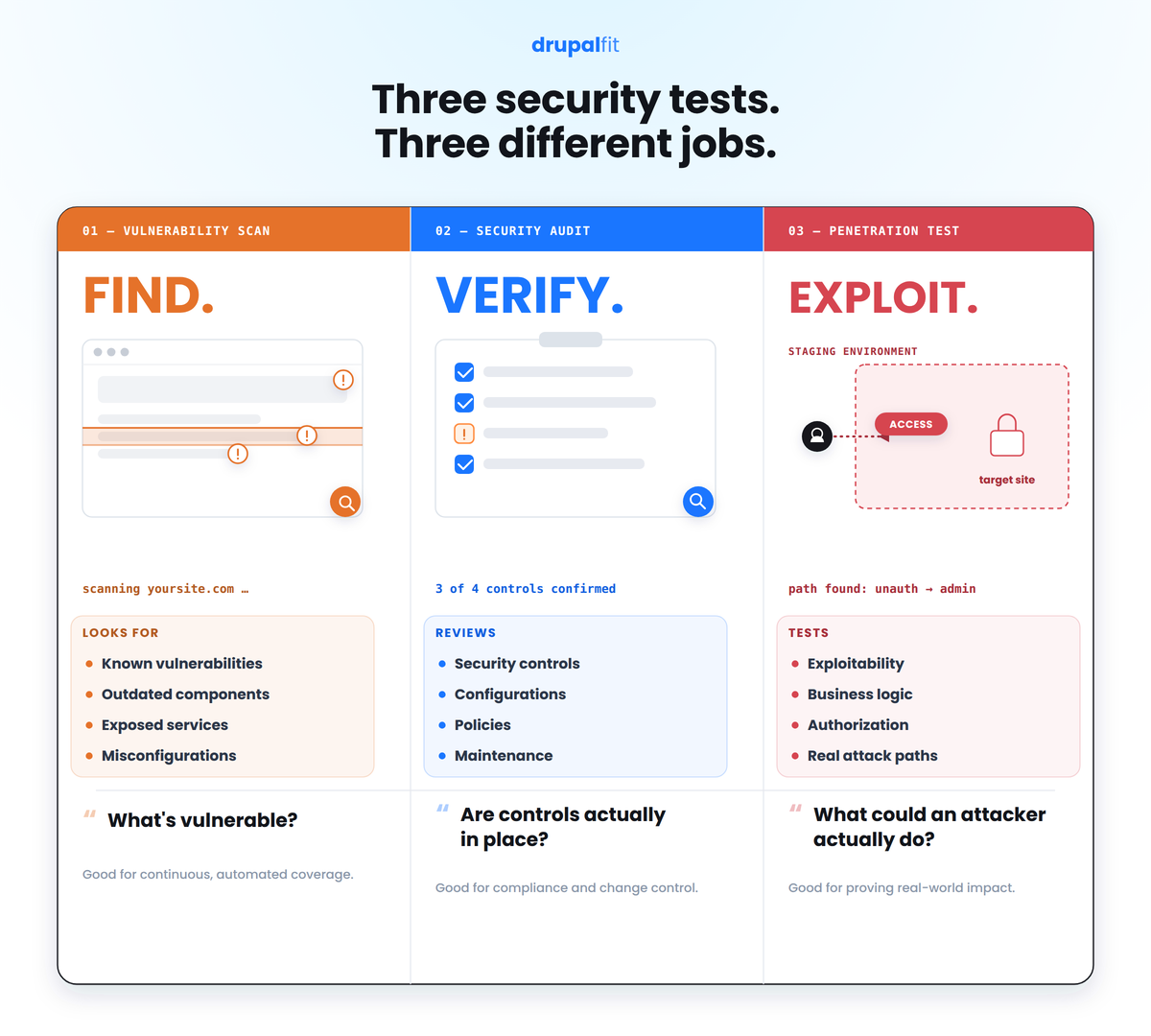
For Drupal, automated scanning can provide regular visibility into the environment, while penetration testing can uncover issues that automated tools may miss, particularly around custom business logic and authorization.
The secret ingredient here is frequency. A penetration test from six months ago cannot account for a vulnerable module installed yesterday.
10. Review third-party integrations and API access
Website security best practices extend well beyond the CMS itself. Payment gateways, marketing platforms, analytics tools, SSO providers, and custom APIs can all connect to your website and create additional entry points.
Start by checking the following:
- Active API keys and tokens
- OAuth and SSO connections
- Webhook endpoints
- Third-party JavaScript embedded on the site
- Permissions granted to connected services
Remove integrations you no longer use and rotate credentials that may have been exposed or haven't been reviewed recently. An unused integration with active credentials can still become a security risk.
How Often Should Drupal Website Security Be Reviewed?
Security doesn't need to be checked in exactly the same way every day. A practical schedule could look like this:
Frequency | What to review |
Continuously | Monitoring and security alerts |
As released | Critical Drupal security updates |
Monthly | Users, permissions, dependencies, and configuration |
Quarterly | Vulnerability scans and access reviews |
Periodically | Penetration testing |
Annually | Policies, incident response, backups, and compliance controls |
Making Security Compliance Part of Drupal Maintenance
The easiest way to maintain website security compliance is to make security part of your regular Drupal development and maintenance process. Monitor security advisories, apply updates promptly, review access, test backups, scan for vulnerabilities, and track remediation.
You can also bring these checks into your CI/CD deployment pipeline. DrupalFit can integrate directly with your development workflow to run automated security checks with every deployment. This helps your team identify new vulnerabilities, configuration issues, or security regressions before they become production problems.
DrupalFit brings these security checks together as part of its broader website audit, with multiple scans covering application, network, and TLS/SSL security. The results are organized by severity with technical details and remediation guidance, giving your team a clear path from identifying an issue to fixing it.
Run a free Drupal website security audit now!
FAQs
Is Drupal secure enough for a compliance-driven website?
Yes. Drupal security is backed by a dedicated Security Team and several built-in security controls. Your configuration, code, and maintenance still matter.
What does website security compliance require?
It means implementing and maintaining the technical and organizational controls required by standards or regulations like GDPR, PCI DSS, or HIPAA, following website security best practices throughout.
Is website security compliance legally required?
It depends on your industry, location, and the type of data your website handles, including whether GDPR website compliance applies.
What should I prioritize first on a Drupal website?
Keep Drupal supported with every drupal security update applied, restrict user access, secure authentication with drupal 2fa, and regularly check for vulnerabilities