
How to Improve Core Web Vitals and Increase Website Loading Speed of Drupal Websites
Palak Agrawal
Published on September 7, 2026
9 min read
Share on:
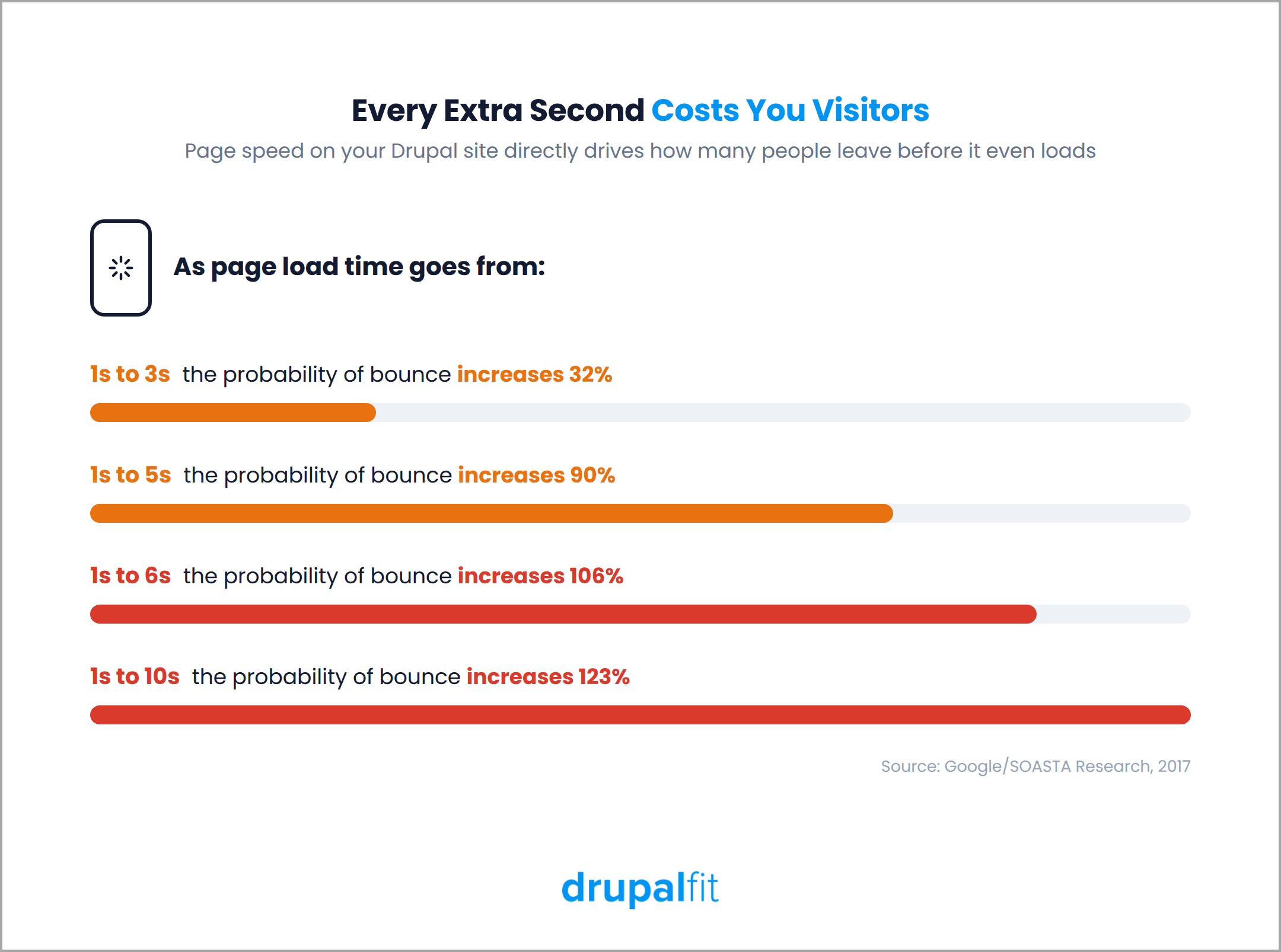
Ever clicked on a website, waited a few seconds, and left before it even finished loading? You're not alone. In fact, according to Google and SOASTA's mobile benchmark research, the probability of a visitor bouncing increases by 32% when load time goes from one to three seconds.
This is where Core Web Vitals or CWV come in.
These metrics help Google measure how a page performs for visitors, including how quickly it loads, how quickly it responds to interactions, and whether the layout stays stable as it loads.
If your website has poor Core Web Vitals, you could be losing visitors and hurting your search performance without even realising it.
So, is there anything you can do to reverse the situation? Absolutely.
In this article, we'll look at how to improve Core Web Vitals and increase website loading speed, ultimately improving your site’s Drupal performance.
Why Do Drupal Sites Fail Core Web Vitals?
Performance problems on Drupal sites usually come from a combination of configuration, content, modules, and custom code. Some of the most common causes include:
1. Too many modules
Contributed and custom modules can add CSS and JavaScript that are not needed on every page
2. Uncached views
Views that run database queries on every request can increase page generation time, especially on content-heavy sites
3. Older or inefficient themes
Themes can accumulate unused CSS, JavaScript, and other code as a site evolves
4. Heavy dynamic rendering
Custom logic, personalised content, and complex page structures can increase the amount of work Drupal needs to do before delivering a page
These problems are easy to miss if you only apply generic website speed recommendations. A proper Drupal performance audit needs to look at how the site is configured and where the time is actually being spent.
According to the 2025 Web Almanac from HTTP Archive, only 48% of mobile sites and 56% of desktop sites pass all three Core Web Vitals. LCP remains the biggest challenge, with only 62% of mobile pages achieving a good LCP score.
With that in mind, here are seven areas worth checking when improving Drupal performance.
7 Ways to Improve Core Web Vitals and Increase Website Loading Speed
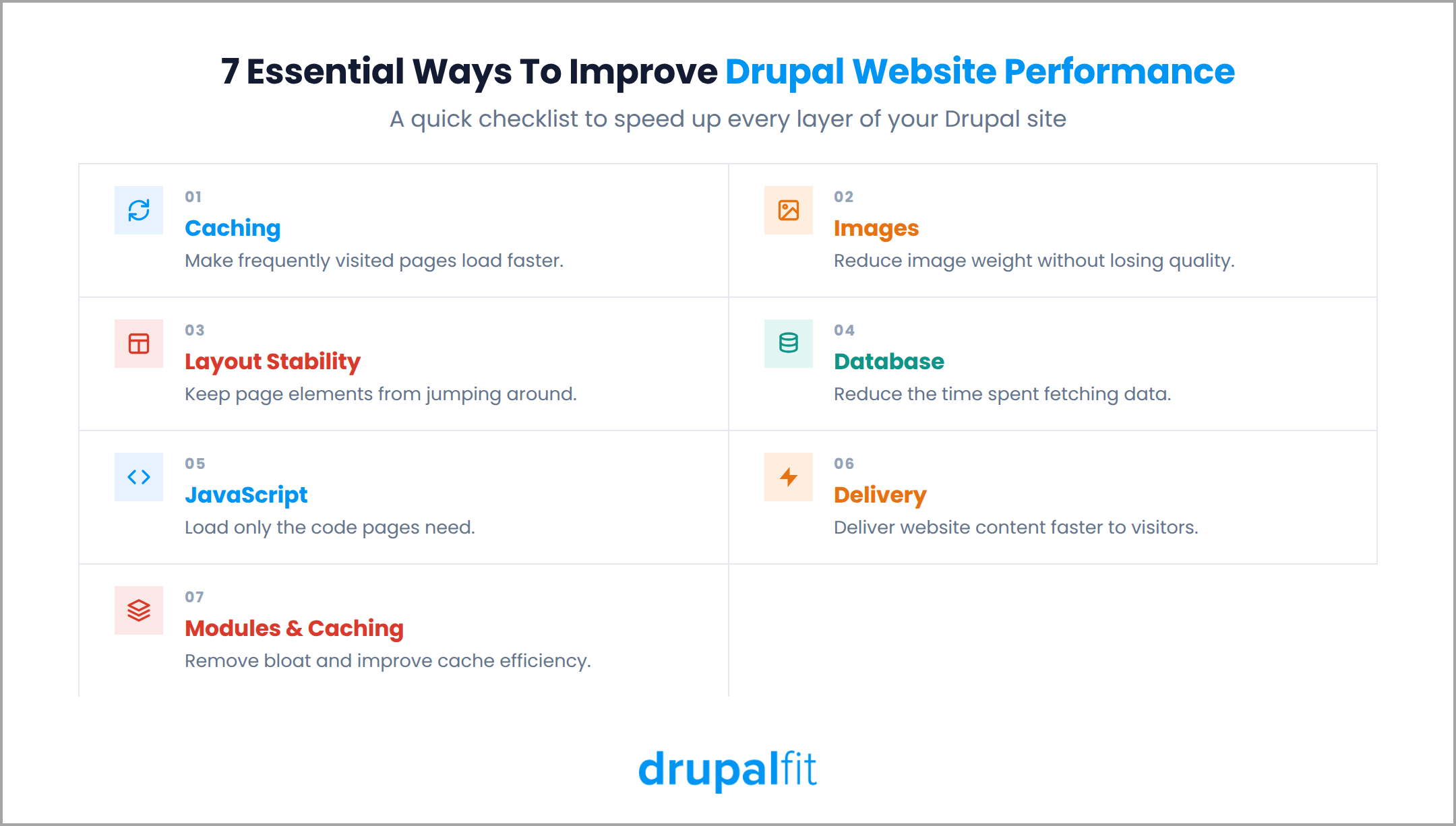
1. Enable Page Caching and BigPipe to Improve Largest Contentful Paint
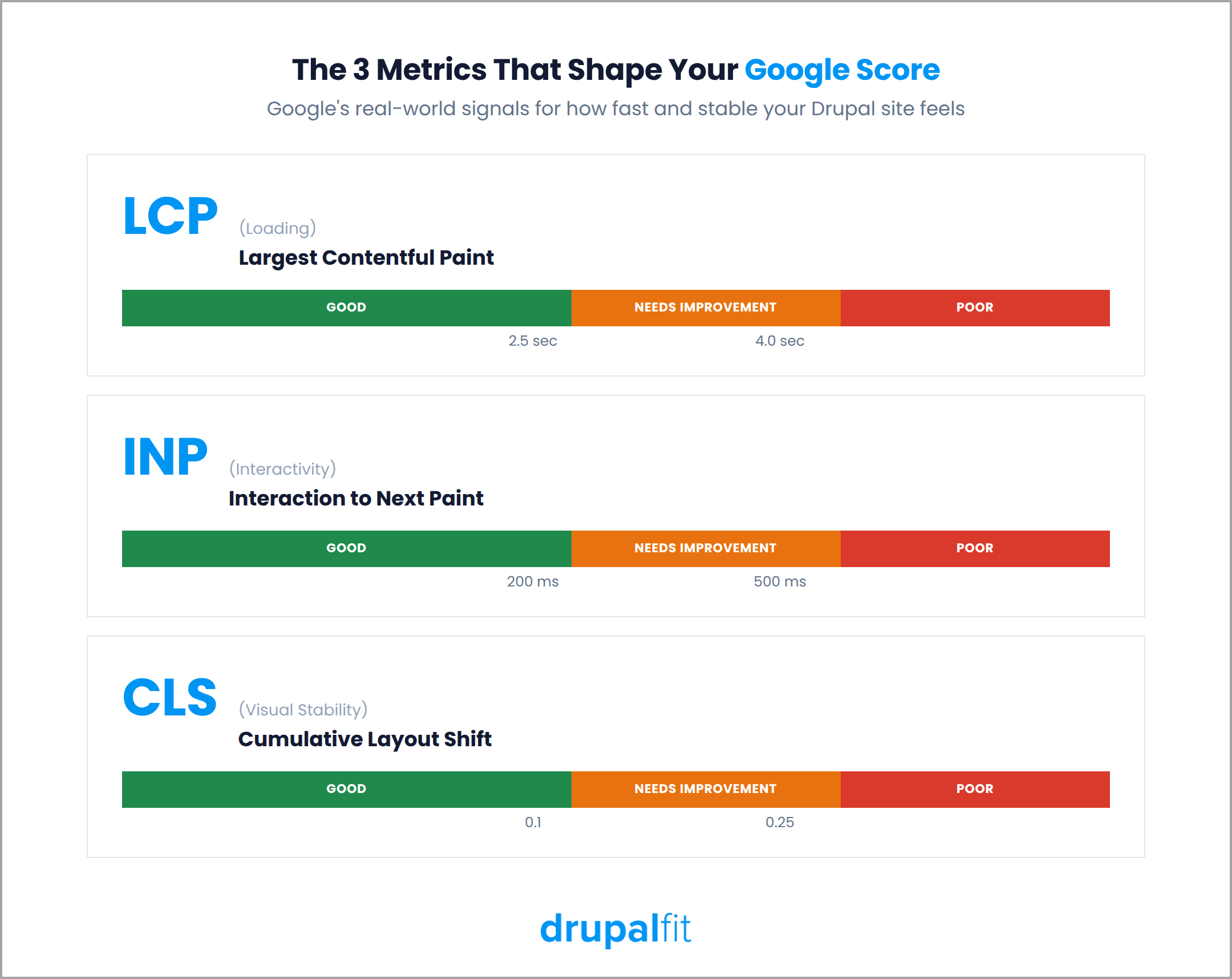
Largest Contentful Paint or LCP measures how long it takes for the largest visible element on a page to load. This is often a hero image, heading, or large content block. Google considers an LCP of 2.5 seconds or less to be good.
Drupal provides several built-in features that can help reduce the time visitors wait for a page:
- Enable Internal Page Cache for anonymous visitors
- Enable Dynamic Page Cache to cache pages and page elements more effectively, including for authenticated users
- Enable BigPipe, which allows Drupal to send the parts of a page that are ready while slower, personalised elements are delivered afterward
The result is a page that can start displaying useful content sooner instead of making visitors wait for every element to be processed.
2. Optimise and Lazy-Load Images for Faster Rendering
Images are often among the largest files loaded by a webpage, which makes them an important part of any website performance optimisation effort. Drupal provides several ways to manage them more efficiently:
- Use Image Styles to create appropriately sized versions of images instead of serving the original file to every visitor
- Use lazy loading for images that are below the fold so they do not need to load immediately
- Consider modern formats such as WebP to reduce file sizes while maintaining good image quality
Pay particular attention to the main image on the page. If it is the largest visible element, an oversized or poorly optimised image can directly affect LCP.
3. Reserve Space for Dynamic Elements to Reduce Cumulative Layout Shift
Cumulative Layout Shift or CLS measures how much a page's layout moves unexpectedly while it loads. You may have seen this happen when an image suddenly appears and pushes the content down, or when a banner loads after the page has already started displaying.
To reduce these shifts:
- Define width and height for images and embedded content so the browser can reserve the required space
- Reserve space for ads, banners, and dynamically loaded blocks
- Check how your theme handles web fonts and use appropriate font-display settings to minimise visible text changes
These changes help the browser build a more stable layout before all page elements have finished loading.
4. Reduce Database Query Overhead to Increase Website Loading Speed
Front-end optimisation is only part of the problem. If Drupal is spending too much time processing database queries, visitors may still experience slow pages. Start by reviewing:
- Views caching for content that does not need to update with every request
- Database indexes on fields that are frequently queried
- Unnecessary or outdated data that can be removed through appropriate maintenance processes
Reducing unnecessary database work can improve response times without requiring major front-end changes.
Drupal itself has also made significant performance improvements in recent releases. Drupal 11.3, released in December 2025, improved database and cache operations, while Drupal's core performance testing reported substantial reductions in database queries on partially warmed caches.
If your site is running an older Drupal version, these improvements are worth considering as part of your upgrade planning.
5. Aggregate and Defer CSS and JavaScript to Improve Interaction to Next Paint
INP measures how quickly a page responds after a visitor interacts with it, such as clicking a button, opening a menu, or entering information into a form. A page can look fully loaded and still feel slow if JavaScript is blocking interactions.
To improve INP:
- Enable Drupal's built-in CSS and JavaScript aggregation
- Defer non-critical JavaScript so it does not block the initial rendering of the page
- Review contributed and custom modules to identify JavaScript that loads on pages where it is not required
Reducing unnecessary JavaScript is particularly important on pages with forms, menus, filters, or other interactive elements.
6. Use a CDN and Enable Compression
Not every performance problem needs to be fixed inside Drupal. The way your content is delivered to visitors also affects loading speed.
A content delivery network or CDN stores static files on servers in different locations, allowing visitors to download them from a location closer to them. You should also enable GZIP or Brotli compression, which reduces the size of files before they are sent to the browser and can reduce transfer times.
Most modern hosting environments and CDNs support these features. If they are not already enabled, they are usually straightforward improvements to make.
7. Audit Modules and Review Drupal Caching
Modules are an important part of Drupal's flexibility, but every additional module can introduce code, assets, or processing that affects performance. Start by reviewing your installed modules and removing anything that is no longer needed.
Then check that your remaining modules and caching system are configured correctly:
- Use Internal Page Cache for anonymous traffic
- Use Dynamic Page Cache where appropriate, including for authenticated users
- Consider a persistent cache backend such as Redis or Memcached for high-traffic sites
Caching should not be treated as a one-time configuration task. As your site changes, new modules, content types, Views, and custom functionality can introduce new performance issues.
What Should You Fix First to Improve Drupal Website Performance?
If your website has multiple performance issues at the same time, it can be difficult to know what to fix first. Based on the recommendations above, here’s how you can prioritise the fixes and improve your Drupal website’s performance.
1. Start with caching
Check Internal Page Cache, Dynamic Page Cache, and BigPipe. These can improve page delivery across the site without requiring changes to individual pages.
2. Optimise images
Check image dimensions, file sizes, formats, and lazy loading. Images are often a major contributor to page weight and LCP.
3. Review database and query performance
Look for uncached Views, inefficient queries, and missing indexes, particularly as your content grows.
4. Review JavaScript and modules
Remove unnecessary modules and assets, and defer JavaScript that is not required for the initial page load.
5. Check CDN and compression
Make sure static assets are being delivered efficiently and compressed before being sent to visitors.
If your main priority is simply how to increase website loading speed rather than passing every metric individually, steps one and two alone will get you most of the way there.
Keep Auditing Your Site Regularly
Performance optimisation is not a one-time task. Your Drupal site changes over time. New modules are installed, content is added, themes are updated, and custom functionality evolves. Any of these changes can introduce new performance problems or undo previous improvements.
That is why regular Drupal performance audits are important. Instead of waiting for visitors to report that a page feels slow, you can identify problems and address them as part of routine maintenance. A DrupalFit audit can help you identify:
- LCP, CLS, and INP issues
- Caching gaps
- Page weight and asset issues
- Performance bottlenecks specific to your Drupal setup
Google and Deloitte's research on page speed also shows why these improvements matter. Even small improvements in loading speed can have a measurable effect on user behaviour and business results.
Run you free DrupalFit audit today!
FAQs
What are Core Web Vitals?
Core Web Vitals are three Google metrics that measure page experience: LCP (loading speed), CLS (visual stability), and INP (responsiveness). Google uses real visitor data to assess your Drupal site.