
What Does A Full Drupal Website Audit Look Like?
Palak Agrawal
Published on February 27, 2026
9 min read
Share on:
"A full website audit provides a complete evaluation of website performance, security, accessibility, and SEO analysis to uncover hidden issues affecting user experience and search visibility. A structured Drupal website audit helps identify gaps early, improve website performance, and support long-term stability, efficiency, and growth."
You can invest heavily in driving traffic to your website, but if underlying issues go unnoticed, much of that effort goes to waste. Slow pages, security gaps, or usability problems quietly affect user experience long before they become visible in reports.
Many website owners recognize something is wrong only when conversions begin to drop or bounce rates increase. By that stage, search rankings, user trust, and overall engagement may already be impacted.
The numbers reflect this reality. Studies show that 53% of mobile users leave a website that takes longer than three seconds to load, while nearly 40% stop engaging with sites that feel difficult to navigate or poorly structured.
What makes the situation more challenging is how these problems are often addressed. Most site owners try to fix these issues in silos, tweaking SEO one week and checking server logs the next. This fragmented approach leaves blind spots that eventually lead to lost revenue.
The only way to stop the guesswork is to do a full Drupal website audit. Instead of looking at parts, you should evaluate your site as a living ecosystem and see how performance, security, accessibility, and SEO work together to either fuel or fail your business.
In this article, we’ll walk through exactly what a full drupal website audit looks like, why it matters, and how it helps maintain a stable, high-performing Drupal website.
Difference Between a Technical Audit vs Full Website Audit
Website auditing is the primary method for business owners to uncover widespread obstacles and practical insights. However, it is easy to confuse a standard technical audit with a holistic health assessment.
Aspect | Technical Audit | Full Drupal Website Audit |
|---|---|---|
| Scope of Analysis | Focuses strictly on backend and structural elements like server performance, page speed, crawlability, and error codes. | Takes a holistic view, covering technical health along with content quality, UX, SEO, and overall performance. |
| Primary Goal | Identifies and fixes technical barriers that prevent search engines or users from properly accessing the site. | Evaluates overall website health and provides insights to improve visibility, engagement, and conversions. |
| Areas Covered | Infrastructure, code efficiency, indexing issues, site architecture, and system-level performance. | Technical foundation plus content effectiveness, user journeys, search optimization, and business alignment. |
| Target Audience | Developers, IT teams, and technical stakeholders responsible for backend implementation and fixes. | Marketing teams, SEO specialists, content strategists, and business decision-makers. |
| Key Outcome | A technically sound, accessible, and error-free website foundation. | A fully optimized website aligned with growth, user experience, and digital strategy goals. |
| Business Impact | Ensures the site functions correctly and can be crawled and loaded efficiently. | Helps organizations improve discoverability, engagement, and ROI from their digital presence. |
A 360-degree Drupal website audit is only effective when it evaluates the website from multiple dimensions, not in isolation. That’s why we built DrupalFit, a full website audit checker, which follows a four-pillar audit methodology designed to examine every layer that contributes to a website’s stability, visibility, and performance.
- Performance
- Security
- Accessibility
- SEO
Together, these four pillars provide a complete picture of a Drupal website’s health covering how it is built, how it performs, ranks, and scales over time.
How to do a Full Website Audit with Example?
To demonstrate how a full website audit works in practice, let’s walk through an example of how you can perform a full website audit using DrupalFit.
To begin, enter the website URL you want to audit. Once the URL is added, the audit automatically starts scanning all pages of the website.
Within a few minutes, the audit starts generating insights across multiple key parameters.
Let’s begin with the first critical metric, performance.
1. Performance
Within a few minutes, the audit generates performance results based on Core Web Vitals, the industry-standard metrics used to measure user experience.
These include:
- Speed Index (SI): How quickly visible content loads.
- Largest Contentful Paint (LCP): Time taken for the largest element to appear.
- First Contentful Paint (FCP): When the first content becomes visible.
- Total Blocking Time (TBT): Duration when the page is unresponsive.
- Cumulative Layout Shift (CLS): Unexpected layout movement during loading.
For every page on your website, detailed scores are provided across each of these performance indicators. For example, the About Us page shows:
- Performance Score: 66%
- SI: 1.65s
- LCP: 1.92s
- FCP: 0.6s
- TBT: 0.55s
- CLS: 0
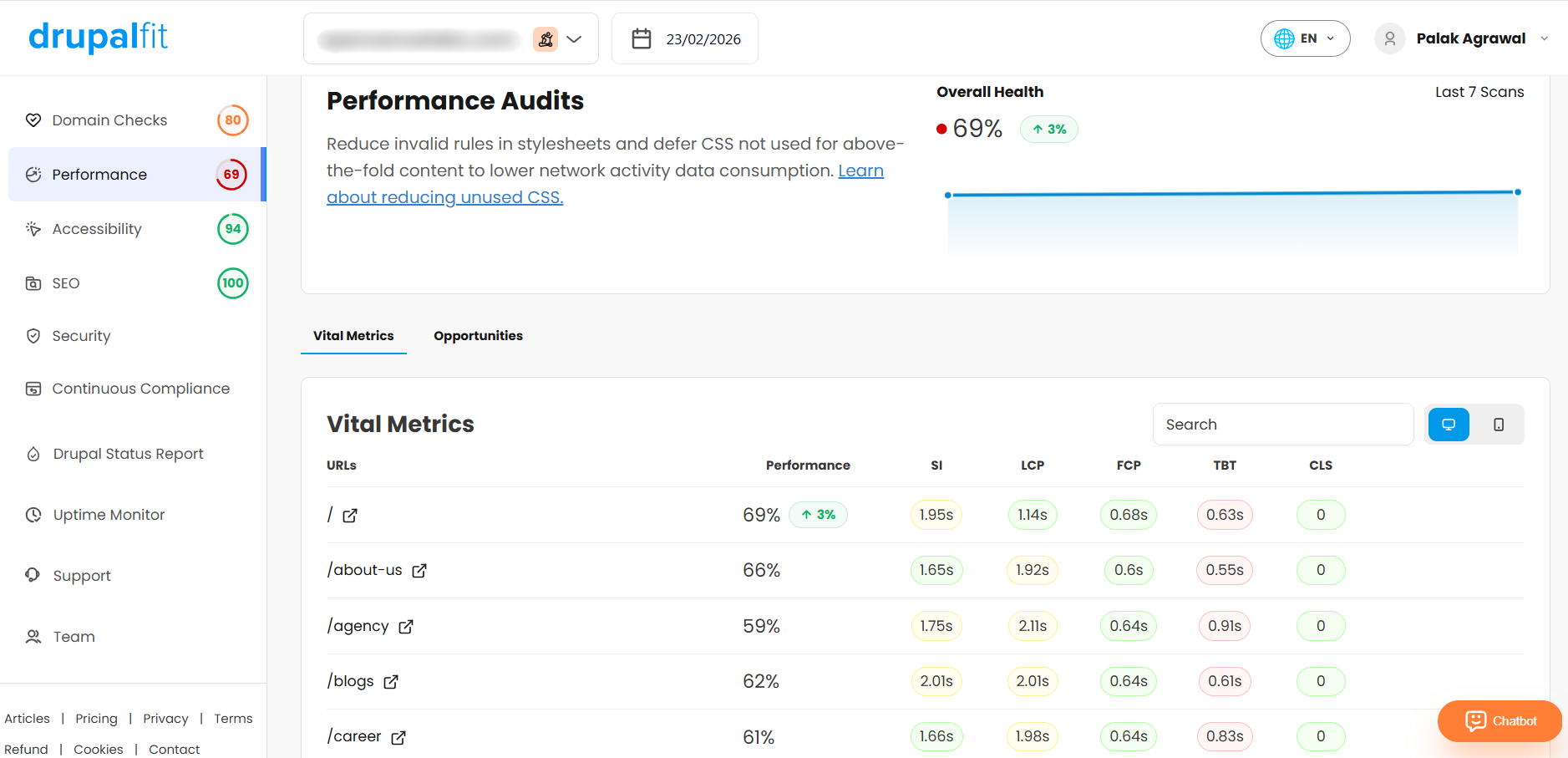
However, to optimize website performance, performance scores alone are not enough. The real value lies in understanding how to improve them. By clicking 'Show Details,' you gain access to a comprehensive diagnostic report outlining specific improvement opportunities. Like in this case, it recommends to:
- Reduce unused CSS
- Eliminate unused JavaScript
- Avoid large network payloads
- Minimize main-thread work
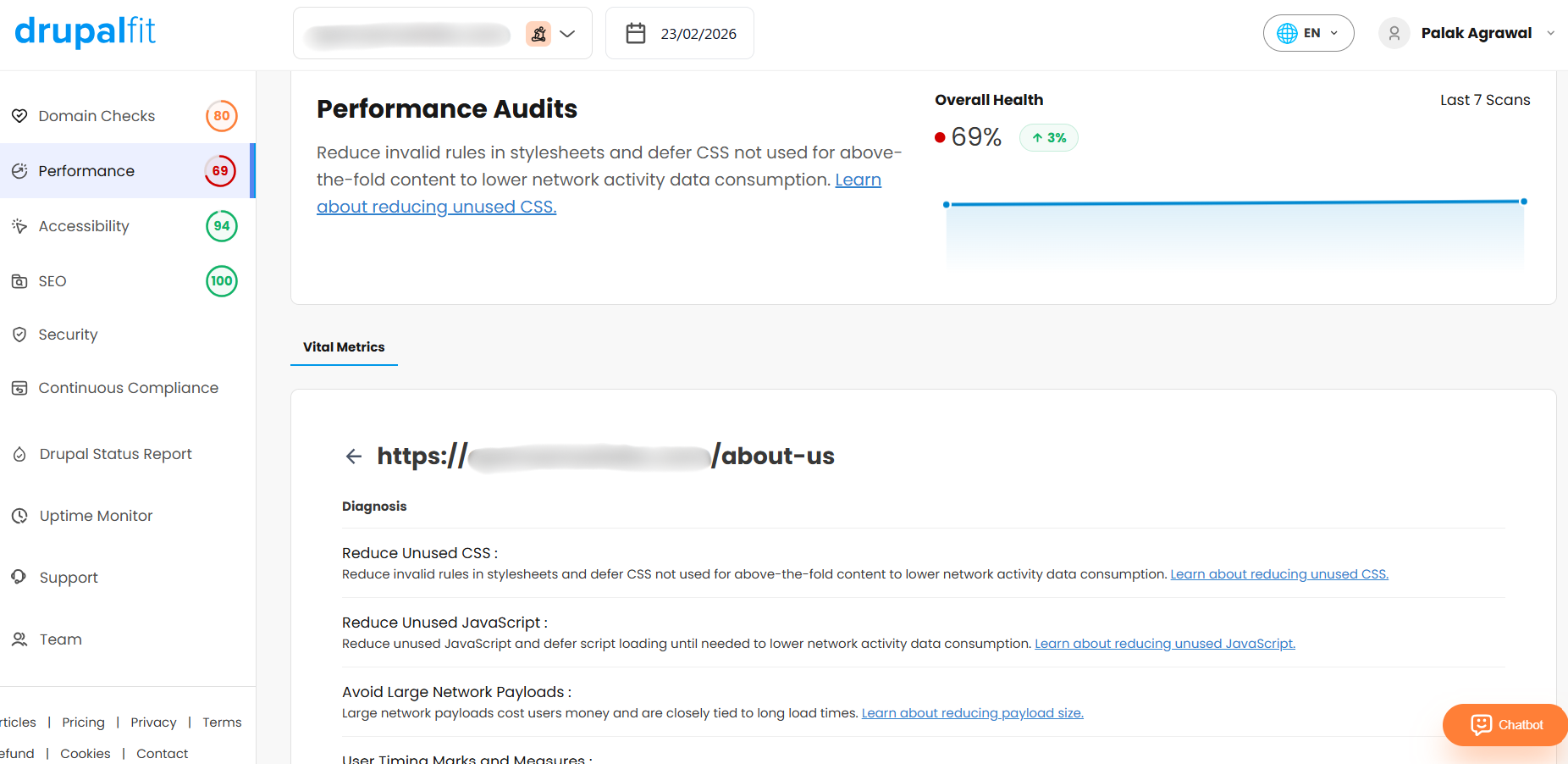
This ensures that you not only understand how your website is performing but also clearly identify where performance bottlenecks exist and how to resolve them effectively.
With performance reviewed, let’s move to another equally important aspect of a full website audit, accessibility.
2. Accessibility
Did you know that if your website serves users in the EU or the US public sector, it may need to comply with WCAG 2.1 AA standards?
Non-compliance can lead to legal action and fines of up to €500,000.
An accessible website allows everyone to use and navigate content without barriers. However, since WCAG includes many technical requirements, it is easy for teams to overlook certain checks during development.
DrupalFit helps simplify this process.
Returning to our earlier example, let’s audit the website for accessibility compliance. From the dashboard, you can choose the WCAG level against which you want to evaluate your pages. Simply click the dropdown menu beside the search bar and select the required accessibility standard.
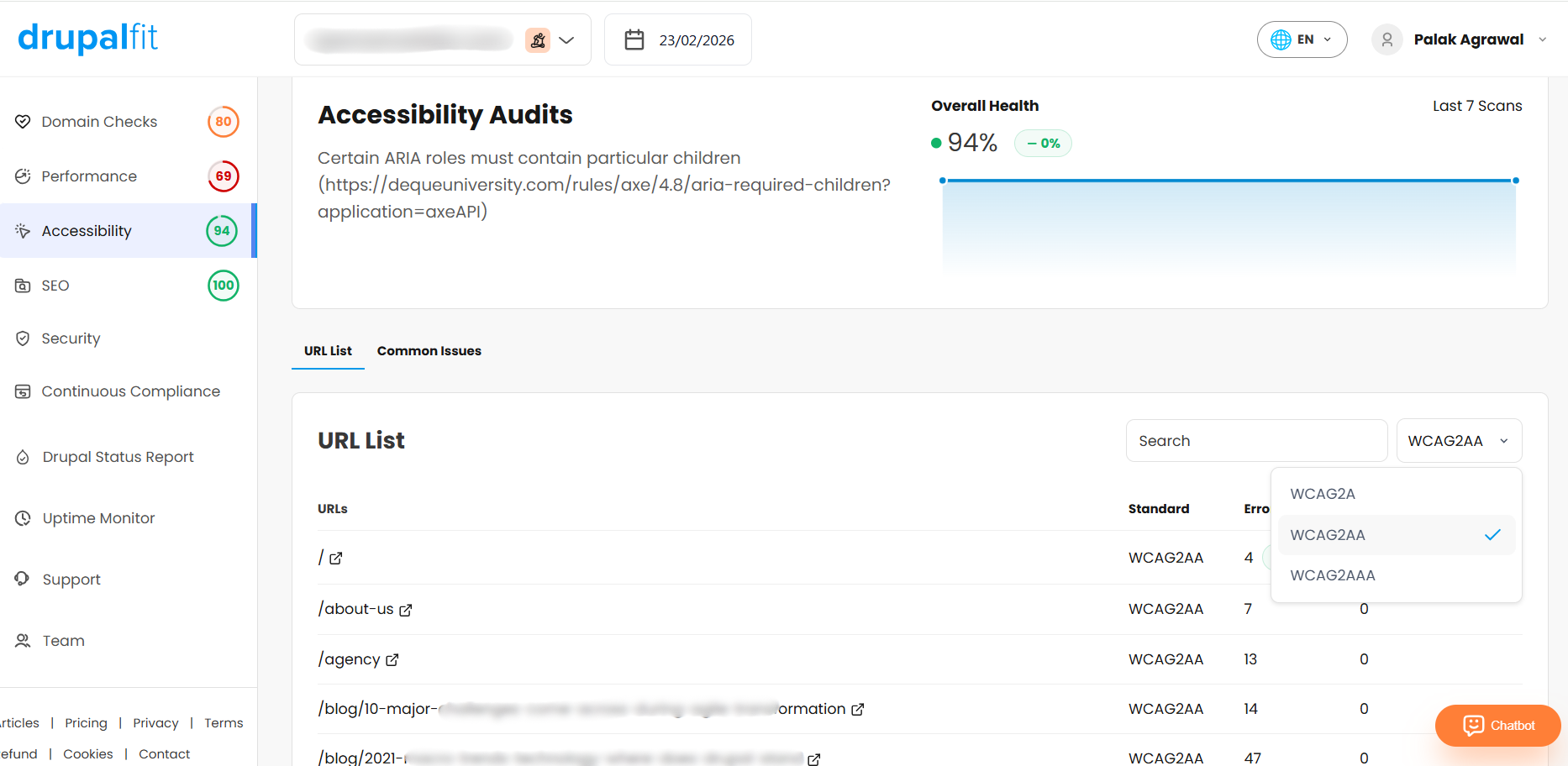
For this demonstration, we selected WCAG AA.
Once selected, the audit results are displayed in a structured format with four key columns:
- URL: The page being evaluated
- Standard: The selected accessibility guideline
- Errors: The number of accessibility violations detected
- Warnings: Potential issues that may impact accessibility
To explore the findings in detail, simply click 'Show Details' for any URL.
A detailed report will display the specific accessibility issues identified on that page, along with clear recommendations on how to resolve them.
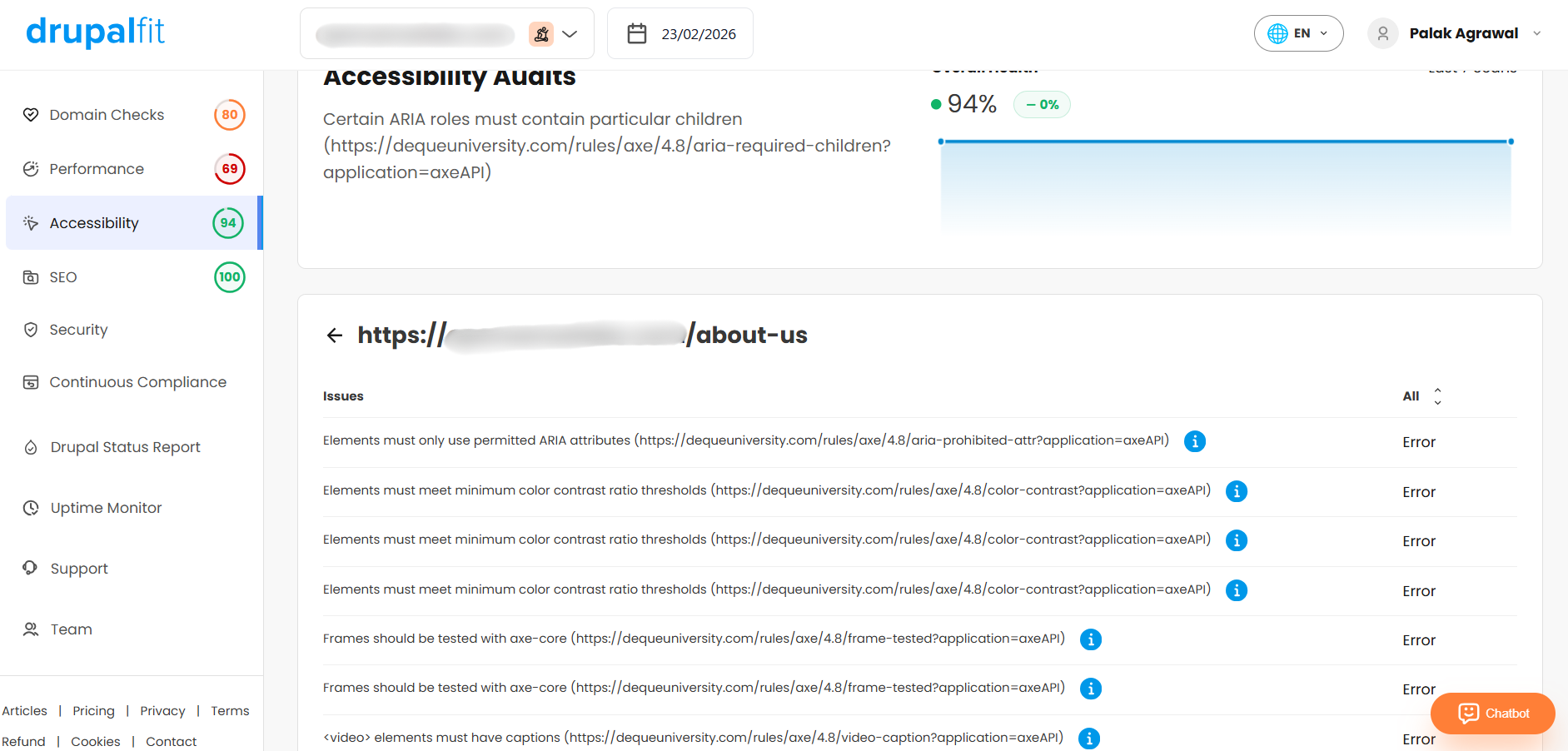
What would typically require hours of manual auditing, or the use of multiple standalone tools, is consolidated into a single, easy-to-understand view. This enables teams to quickly identify accessibility gaps and take corrective action with confidence.
Now, let’s move to the next important parameter, i.e, security.
3. Security
With reports of cyber breaches appearing almost every day, website security has become a priority for organizations of all sizes. However, running multiple security checks, from OWASP scans to network vulnerability assessments, can take significant time and effort when done separately.
DrupalFit brings these website security scans together in one place.
Simply, navigate to the Security section from the side panel on the main dashboard. Here, you will see the following scans available:
- OWASP ZAP – Passive Web Application Scan
Identifies common web application security issues without actively interacting with the website. - OpenVAS – Network Vulnerability Scan
Scans servers and network assets for known vulnerabilities, outdated software, CVEs, and configuration issues. - OWASP ZAP – Active Web Application Scan
Tests web applications for vulnerabilities such as SQL injection, cross-site scripting (XSS), and remote command execution. - Nmap TCP – Port Scan
Detects open TCP ports and running services across the system. - Nmap UDP – Port Scan
Identifies exposed UDP services that may present security risks. - Sslyze – TLS/SSL Encryption Security Scan
Reviews TLS/SSL configurations for weak encryption settings and certificate-related issues.
Based on your requirements, simply select the scans you want to run and click 'Run Selected Scans.'
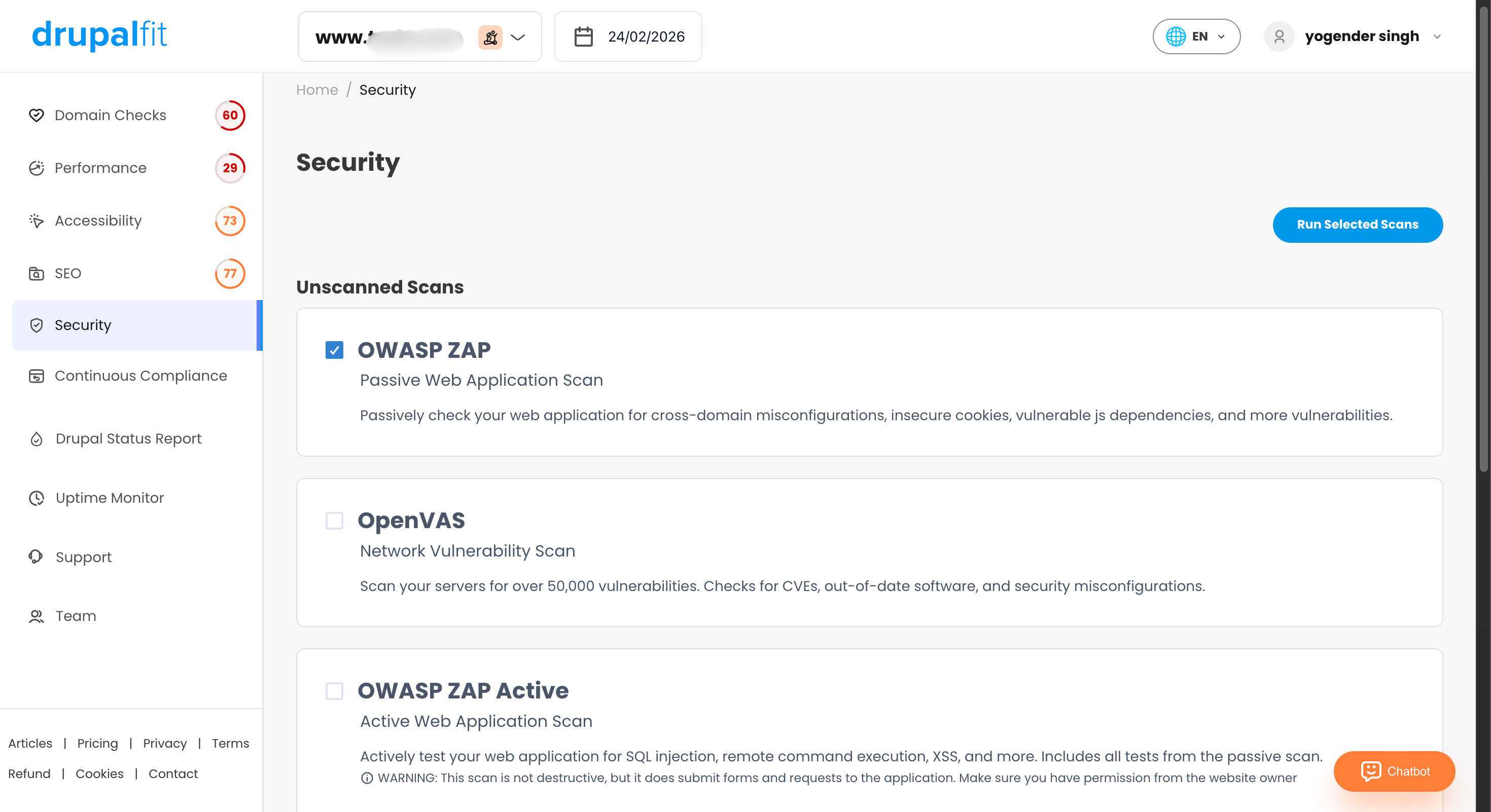
Within a few minutes, the scans are completed. The results are grouped into three categories, Critical, Medium, and Low, indicating the severity of the findings.
To review the results:
- Click 'View Report' to open the detailed report.
- Select 'View Details' to see a full explanation of each issue along with suggested fixes.
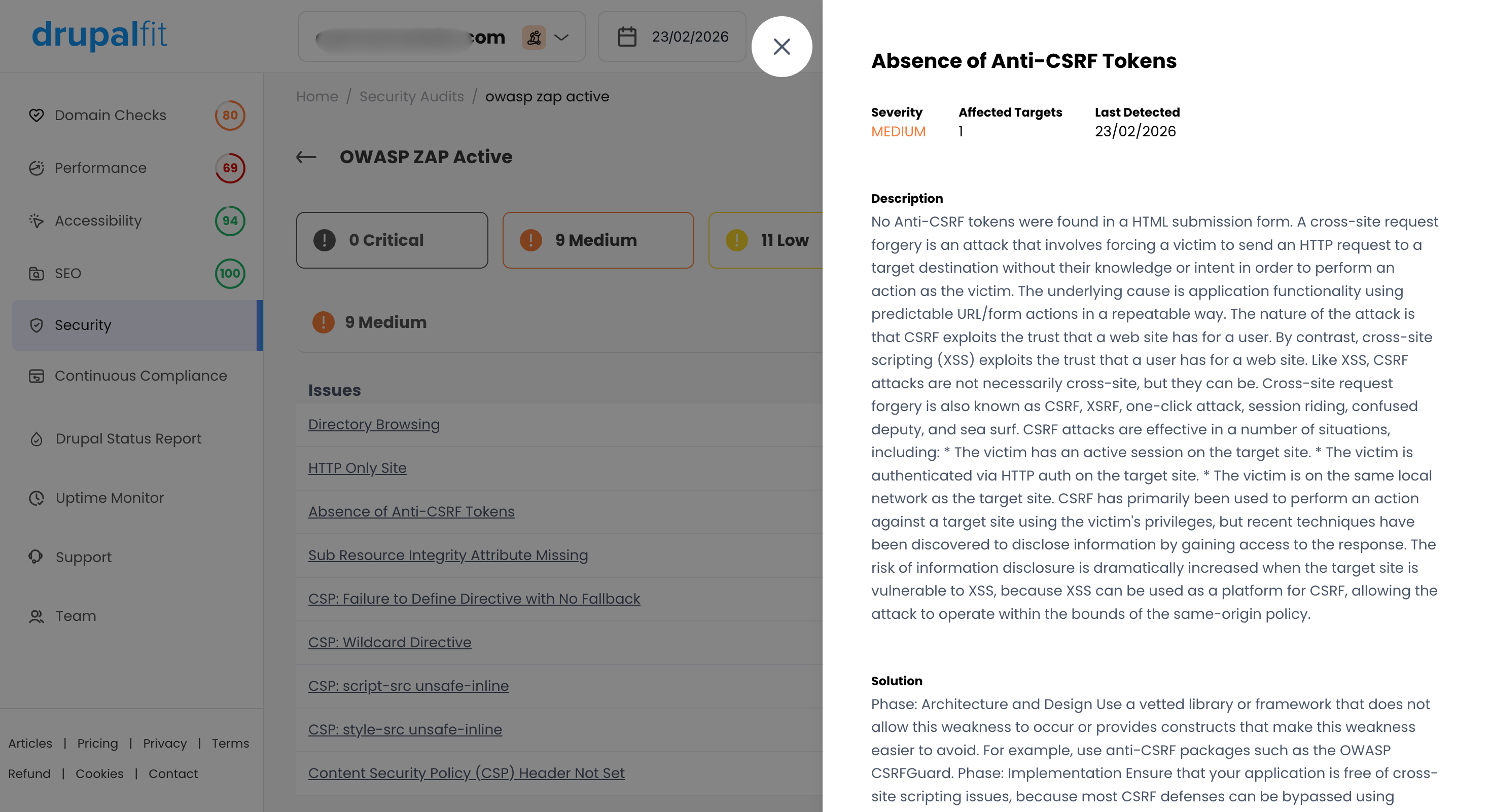
Since issues are already organized by severity, teams can begin by addressing the most serious findings first.
This makes it easier to identify security gaps, resolve vulnerabilities quickly, and reduce the time and effort required to maintain a secure website.
Next, let’s look at another important factor that affects website visibility i.e, SEO.
4. SEO
SEO plays an important role in how easily users can find your website online. While on-page SEO analysis remains essential, off-page factors have become equally important, especially with the growing focus on Generative Engine Optimization (GEO) and Answer Engine Optimization (AEO).
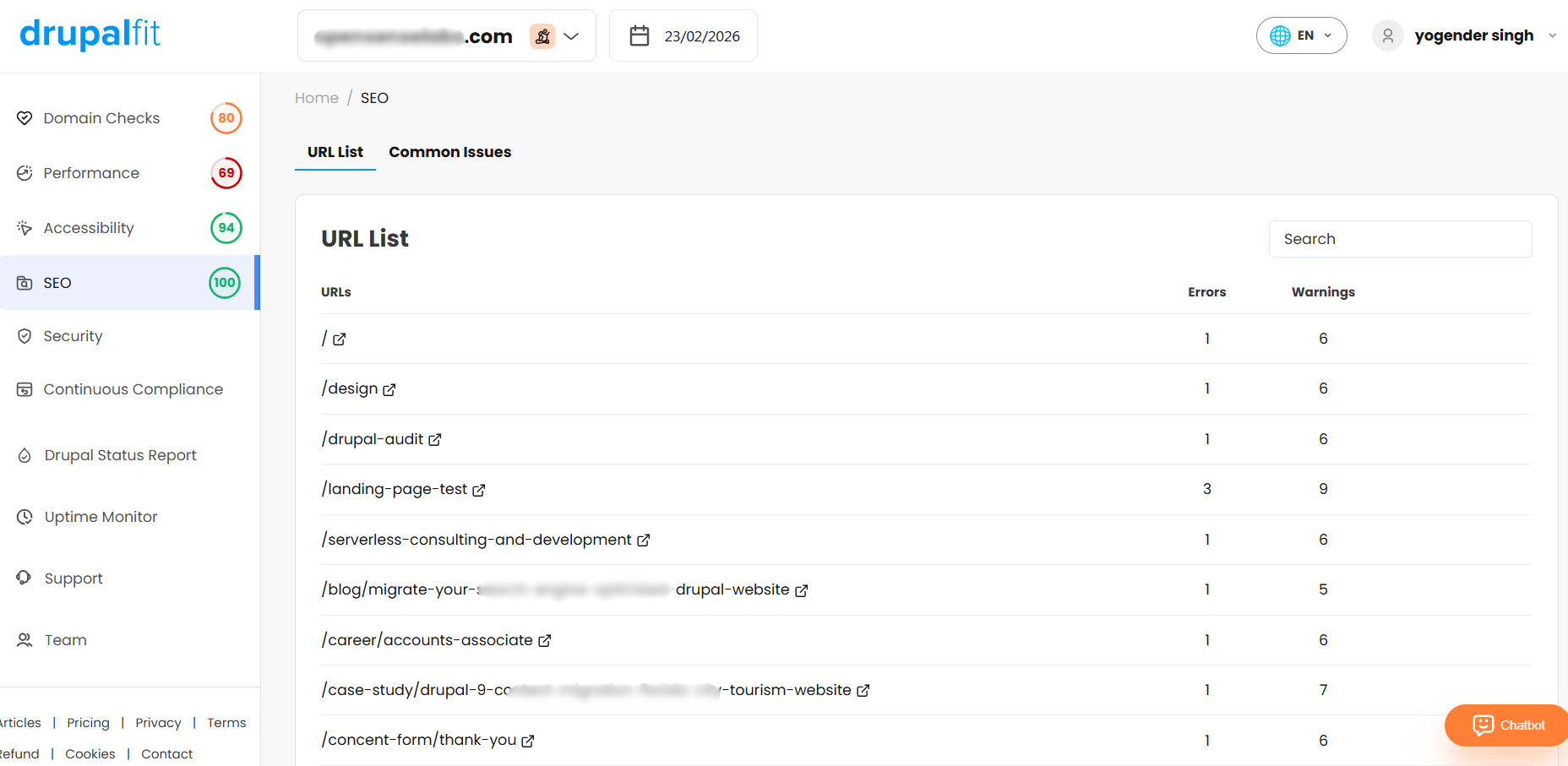
DrupalFit allows you to review these aspects without relying on external tools.
To do your website’s technical SEO analysis, navigate to the SEO section from the side panel. The SEO dashboard will then appear, displaying a list of all URLs available on your website.
Next to each URL, you will find the 'Show Details' option. Click on it to access a report highlighting the technical SEO issues identified for that specific page.
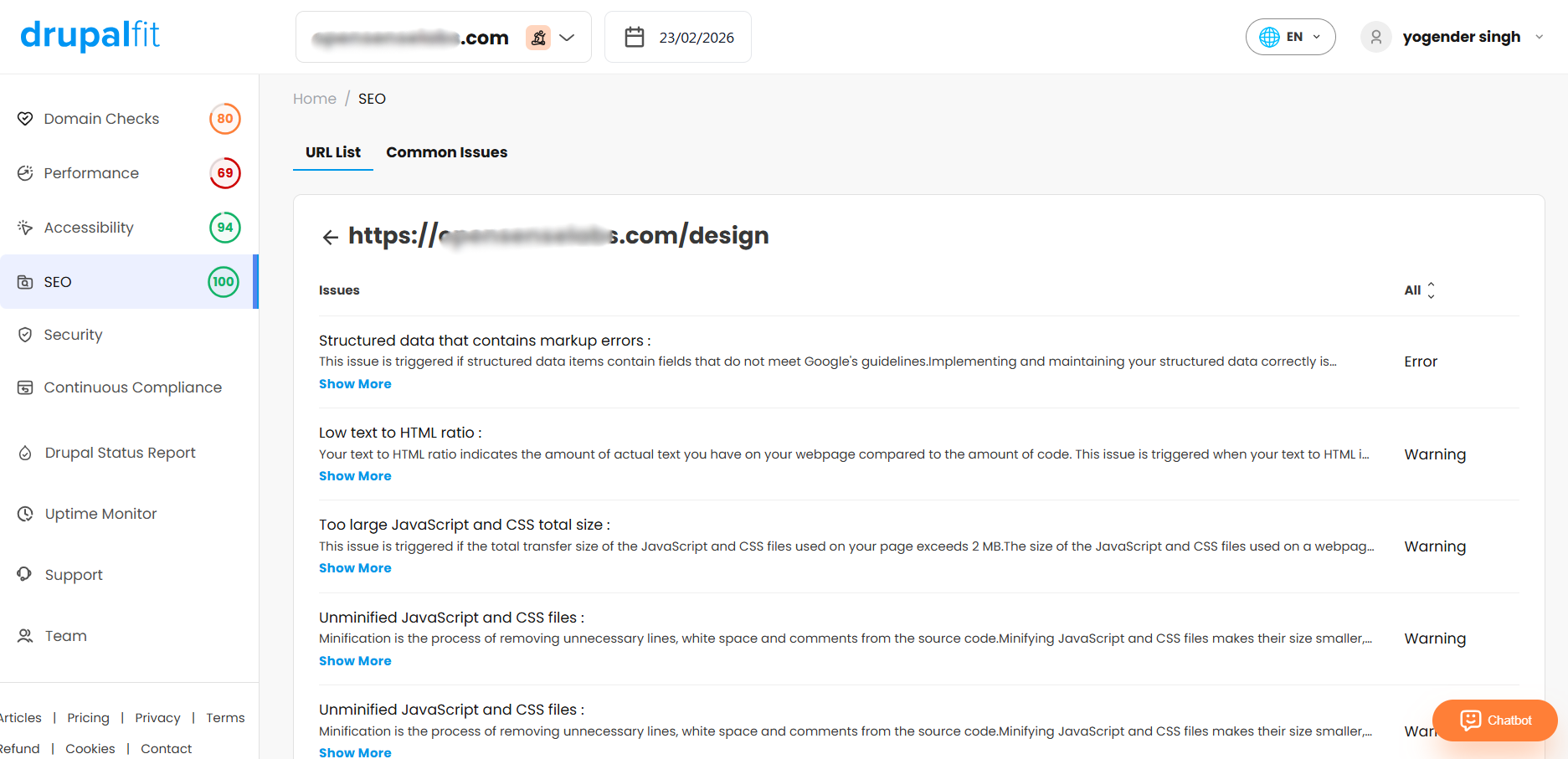
The report also provides suggested resolutions, helping you understand what needs improvement and how to address it.
By acting on these recommendations, you can improve your website’s visibility, achieve better rankings on search engines, attract more visitors, and increase the chances of generating qualified leads.
The Bottom Line
A modern website’s success depends on more than good design or strong content. Performance, accessibility, security, and SEO all need to work together to deliver a smooth and reliable digital experience.
DrupalFit brings these areas together into a single, unified platform.
Instead of relying on multiple tools or conducting manual audits, DrupalFit provides teams with a clear and structured view of their website’s overall health, along with practical steps for improvement.
With DrupalFit, you gain:
- Complete visibility across performance, accessibility, security, and SEO
- Clear recommendations for improvement
- Issues organized by priority
- Faster optimization and maintenance cycles
- Reduced time and operational effort
So, don't wait for a dip in rankings or a security breach to find out your site is struggling. Run your first full website audit today and turn your website back into your most reliable asset.